Creating permeability logs
Once you finish defining your permeability function model, it is crucial to validate and verify your model. To QC your model at well level, you can use the Permeability Logs tool (model > Permeability > Tools > Permeability Logs). This is to ensure that everything has proceeded as intended so that the predicted permeability (i.e. based on your function model) honors the measured core permeability and/or the well-test derived permeability values.
Keep in mind that the permeability function model parameters can be scale dependent. When you create permeability logs for QC purposes, the resolution of the modeled permeability will depend on the resolution of the assigned input (on the Assign Data form). Since permeability is defined on a logarithmic scale, carefully consider the resolution of the assigned logs as they will determine the extreme high and low permeability values.
There also might be significant differences between the measured core permeability and the well test derived permeability values. This might be due to many factors such as: core sample not being representative of the reservoir heterogeneity, whether the samples being drilled parallel or perpendicular to bedding planes, the scale of the measurement, the thickness of the tested reservoir, whether the absolute or the effective permeability is determined, the overburden pressure, slippage effect of gas (i.e. Klinkenberg effect) etc.
To create permeability logs
- On the Create Permeability Log form, select the permeability function model from the Function model drop-down list.
- The log sets which you have assigned on the Assign Data form are used as input for calculating permeability logs.
- Click Apply to create the permeability logs and keep the form open, or click OK to create the logs and close the form.
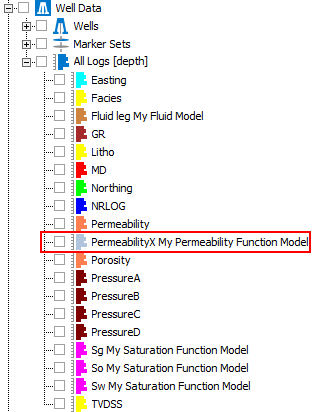
PermeabilityX log in the JewelExplorer. If you edit the name of your permeability function model, the log name will be automatically updated. click to enlarge
PermeabilityX logs are created and appear in the JewelExplorer with the suffix of the permeability function model name under Well Data > All Logs. If you right-click on All Logs and select 'Sort Logs per Property Template' the permeability logs will appear in the PermeabilityX folder.